

In conzept 16 version 5.7.04, we added a search function to the Designer’s trees. We will now make this available to conzept 16 developers as well, so that the search function can be used within their own applications—that is, at runtime. This article explains how to use the search function.
Complex tree structures can quickly become confusing. Take, for example, a tree that represents a directory structure. It contains multiple folders, subfolders, and files. If you’re looking for a specific file, this can sometimes result in a very lengthy search process. For this reason, the TreeView object has been enhanced with a search feature.
Use search
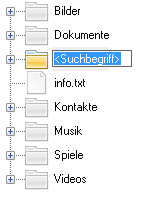 Suche im TreeView
Nothing could be easier! To use the search function, simply set the new property wpSearchEnabled of the TreeView object to true. The search is performed based on the display text of the nodes in the tree. By default, the following keys are used for this:
Ctrl + F– Starts the searchF3– Find the next matchShift + F3– Find the previous match
The keys and keyboard shortcuts are defined in the Properties and can be customized.
In addition, the new command WinTreeNodeSearch() allows you to search for a node procedurally.
Advanced search options
The search iterates through all nodes in the TreeView and compares the search expression with the node’s wpCaption property, or optionally the wpCustom property. The developer can decide how the comparison is performed. In addition to a wildcard search, regular expressions and a term-based search are also available.
In addition, it is possible to implement custom search algorithms. To this end, the TreeView object has been extended with the EvtNodeSearch event. This event is triggered for every node that is processed during the search. Here, for example, the internal text associated with a node could be searched for the search term. If the term is found, the corresponding node can be marked as a match. The search ends as soon as a node is identified as a match, the tree has been traversed completely, or the user cancels the search.
sub EvtNodeSearch
(
  aEvt                  : event;            // Event
  aNode                 : handle;           // Node
  aPattern              : alpha;            // Search term
  aFlags                : int;              // Search options
  aAction               : int;              // [in, out] Action
)
: logic;                                    // Continue searching?
{
  // Remember the start time of the search
  if (gSearchStart = 0)
    gSearchStart # SysTics();

  // If the text associated with the node contains the search term
  // Mark node as a match
  if (aNode->Node.TextContains(aPattern))
    aAction # _WinTreeNodeSearchFound;

  if (aAction & _WinTreeNodeSearchFound != 0)
    gSearchStart # 0;

  // Cancel search after 30 seconds
  if (SysTics() - gSearchStart > 30000)
  {
    gSearchStart # 0;
    return (false);
  }

  return (true);
}