
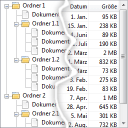
The TreeView and the DataList objects are two of the most commonly used UI objects in conzept 16 for visualizing dynamically generated data.
The TreeView object is primarily used to display hierarchical structures. The DataList object, on the other hand, is mainly used to display equivalent but more detailed information.
In this article, I would like to introduce you to a Modul that extends a DataList object with the features of a TreeView object.
TreeView
The main advantage of a tree view over a list view is that it allows users to hide information that is irrelevant to them by collapsing individual branches of the tree. In addition, the tree view makes it very easy to visualize hierarchies or dependencies in the data.
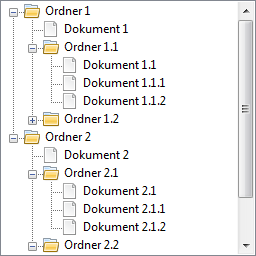 TreeView-Objekt
DataList Object
Typically, the information contained in a single element within a TreeView object is limited to a small amount of data, such as the element’s name. In a DataList object, however, the information for a single element can be divided into any number of columns.
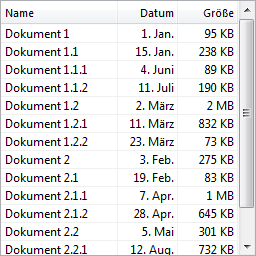 DataList-Objekt
TreeList
The “MdlTreeList” module extends the DataList object with the benefits of the TreeView object: the ability to collapse individual elements and the easy visualization of hierarchical structures.
 TreeList-Objekt
Additional columns within the DataList object are required to store the hierarchy and display the icons. With conzept 16 version 5.7.05 and the dynamic columns, the module can create and delete these columns automatically.
The module’s interface is based on the functions of the TreeView and DataList objects. Here is an excerpt:
LineAdd // Add a Line
(
  aVarOrLineParent      : handle;       // Instance or Parent Line
  opt aCaption          : alpha(4096);  // Title
  opt aImage            : int;          // Image “collapsed” (_Win.TreeListImage...)
  opt aImageExp         : int;          // Image “expanded” (_Win.TreeListImage...)
  opt aLineNext         : handle;       // Next Line
)
: handle;                               // Line

LineRemove // Remove line
(
  aLine                 : handle;       // Line
  opt aChildrenOnly     : logic;        // Remove only Child Lines
)

LineCaptionSet // Titel setzen
(
  aLine                 : handle;       // Line
  aCaption              : alpha(4096);  // Titel
)

LineImageSet // Insert image
(
  aLine                 : handle;       // Line
  aImage                : int;          // Image “collapsed” (_Win.TreeListImage...)
  opt aImageExp         : int;          // Image “expanded” (_Win.TreeListImage...)
)

LineExpand // Expand Line
(
  aLine                 : handle;       // Line
)

LineCollapse // Zeile zuklappen
(
  aLine                 : handle;       // Line
)

LineDynamicSet // Ensure that Child Lines are dynamically added or removed (when expanding or collapsing)
(
  aLine                 : handle;       // Line
  aDynamic              : logic;        // Child Lines are added dynamically
)

CellSetA // Zelle setzen (Typ: alpha)
(
  aLine                 : handle;       // Line
  aColumnNo             : int;          // Column number
  aValue                : alpha(4096);  // Value
)

// Set EvtFold event - Triggered before a line is expanded or collapsed.
EventFoldSet
(
  aVar                  : handle;       // Instance
  aEvt                  : alpha(61);    // Function
)
Example
...
@I:MdlWinTreeListInc

...
// Initialize the TreeList object
tTreeList # MdlWinTreeList:Init(
  $dlDataList,        // DataList-Objekt
  5,                  // Number of image columns in the DataList object
  1,                  // Column number for title
);
// Add a line to the list
tTreeLine # tTreeList->MdlWinTreeList:LineAdd(‘Folder 1’, _Win.TreeListImageFolder);
// Add a Child Line to the line
tTreeLine # tTreeLine->MdlWinTreeList:LineAdd(‘Document 1’, _Win.TreeListImageDocument);
// Set the 2nd cell
tTreeLine->MdlWinTreeList:CellSetA(2, ‘Jan. 1’);
// Set the 3rd cell
tTreeLine->MdlWinTreeList:CellSetA(3, ‘95 KB’);
...
// Terminate the TreeList object
tTreeList->MdlWinTreeList:Term();
...
The download link at the end of the article includes not only the module itself but also an example of how to use it.
The module gives developers a great deal of freedom in terms of visual design and also allows them to customize and extend it.
Conclusion
The wide range of surface objects that conzept 16 comes with out of the box can be expanded with your own objects—though this requires some effort, the result is tailored to your specific needs. Incidentally, the Slider-Objekt and the search bar for RTFEdit objects.
Have you developed your own general-purpose objects for your applications that you’d like to showcase here on the conzept 16 blog and share with other developers? We’d love to hear from you =).