
Accessing network resources via a Windows service application

The concept of Windows services was introduced with Windows NT 3.5. These are programs that run in the background without requiring user login. They are usually started automatically when the operating system boots up and do not have a user interface. With the SOA service, we provide our developers with the ability to create their own programs as service applications.


Typically, service applications are designed so that access to the system’s local resources is sufficient for processing. However, depending on the task at hand, it may be necessary to access shared directories or network printers.

In principle, it is possible to access network resources even from within a Windows service. However, this requires changing the context in which the service runs. By default, services in Windows—including the SOA service—are started under the “local system account”. As the account name suggests, it grants the service extensive privileges on the local computer. However, there is no access to the network in this context.

To do this, the service must log in using a user account that has the necessary permissions. The service settings can be accessed via Control Panel -> Administrative Tools -> Services. Alternatively, you can launch the management console via the Run dialog by entering “services.msc”. After selecting the “conzept 16 SOA Service” service, the desired user account can be specified on the “Log On” tab. Once the change has been made, the service must be restarted.
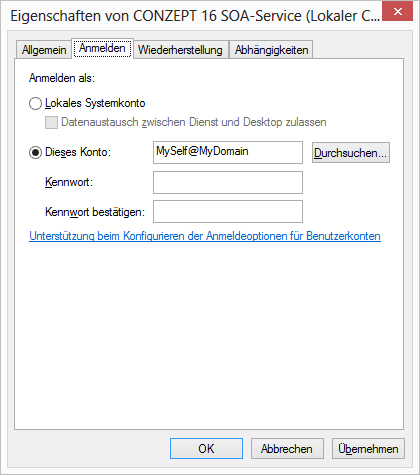
conzept 16 SOA Service
What should you keep in mind?

In practice, users are accustomed to accessing shared folders via a network drive. However, network drives are not available to a Windows service. Instead, access to the shares must be established using the UNC (Universal Naming Convention) format ().

Example:

// Creating a file
FsiOpen('\\MyServer\MyShare\Documents\MyFile.txt',_FsiStdWrite)

When reinstalling the SOA service, the settings related to login credentials are lost because the service is set up using the default account (“Local System Account”). This also occurs when upgrading to a higher major release of the SOA service, as the existing version is removed during the upgrade. Ideally, precautions should be taken in the program to detect a change in the account. The account name can be determined using the conzept 16 function UserInfo() and the option _UserSysAccount.

Example:

// Determine the user ID
tUserID # UserInfo(_UserCurrent);
// Determine user name
tUser   # UserInfo(_UserSysAccount,CnvIA(tUserID));

If the service is running under the local system account, UserInfo() returns the name “SYSTEM”.

Klicken Sie hier, um die Nutzungsbedingungen für unseren Blog zu lesen.

Leave a Reply

Your email address will not be published. Required fields are marked *

Leave the field below empty!

Requests, questions or feedback are welcome:

Terms of use of the comment function in the blog

1. General information

Vectorsoft AG (‘Provider’) provides a public blog for Internet users (‘Users’) on the vectorsoft.de website. The public blog is intended for the exchange of information and ideas. Users who participate with contributions and comments undertake to comply with the blog terms of use and are responsible for the accuracy, appropriateness and freedom from legal infringements of their contributions. By using the comment function in our blog, you accept these terms of use.

2. Netiquette

We ask you to refrain from personal attacks and provocations based on other opinions. Please argue objectively and maintain a constructive discussion culture. Your comment should always be related to the topic in question in order to avoid digressions into other topics. Posting the same comment or several similar comments more than once is not permitted.

3. Prohibition of illegal content

By submitting your comment, you confirm that you are not violating any copyrights or other rights of third parties. Inciting, racist statements, instructions for criminal offences and their glorification, depictions of violence, pornographic content and statements that violate personal rights are prohibited.

4. No advertising

The use of the comment function is not permitted for commercial or party-political purposes. Advertising contributions of any kind will be deleted immediately.

5. Details of the name

When entering your name, pay attention to the principles mentioned above.

6. Source references

If you intend to publish quotes or contributions from third parties, please indicate the respective sources and explain how they relate to the blog post.

7. Violation of the terms of use

Posts that violate this policy will be deleted immediately. If you notice any violations yourself, please send us the link to the comment in question by e-mail to . We expressly point out that we will exclude individual users in the event of repeated or serious violations of these terms of use.

As of: Sept. 2024

Get your Trial Version now!

Test yeet free of charge

IHRE EVALUIERUNGSLIZENZ - JETZT ANFORDERN!

TESTEN SIE DIE CONZEPT 16 VOLLVERSION - UNVERBINDLICH und KOSTENFREI

Subscribe to our newsletter

Anrede*
     
Zustimmung zur Datenverarbeitung gem. DSGVO*


WordPress Cookie Notice by Real Cookie Banner